- Home Page /
- Electronics /
- Television & Video /
- Television Accessories /
- Remote Controls /
- Remote Control for Humax RM-E08 VAHD-3100S Se...
0 ratings

Item #:
27187860
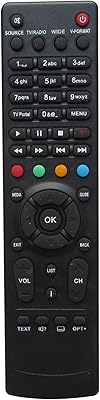
Remote Control for Humax RM-E08 VAHD-3100S Set Top Box AudioVideo Player
Item #:
27187860
XOF 14816
Price Details
Excluding Shipping & Custom charges ( Shipping and custom charges will be calculated on checkout )
*All items will import from US
0 ratings
Write a review
In stock
 Imported from USA store
QTY:
Order now and get it around Thursday, July 16
Secured transaction
Ubuy works hard to protect your security and privacy. Our advanced payment security system ensures confidentiality by encrypting your information during transmission using AES (Advanced Encryption Standards) and SSL (Secure Socket Layer) protocols. Your payment details are 100% secure as we do not share your payment details with third party sellers.
Our Top Logistics Partners


Make sure our remote match with the model no of your unit

Fast
Shipping

Free
Return*

Secure Packaging

100% Original Products

PCI DSS Compliance

ISO 27001 Certified


Note: Step Down Voltage Transformer required for using electronics products of US store (110-120). Recommended power converters Buy Now.


What Stands Out
Universal Compatibility
Designed to seamlessly control various Humax models, including RM-E08 and VAHD-3100S, ensuring you can operate multiple devices with one remote, enhancing convenience for users.
Ergonomic Design
Crafted with user comfort in mind, its lightweight and well-placed buttons facilitate easy navigation, making it accessible for all ages while enjoying your favorite shows.
Easy Setup
Plug-and-play functionality allows for straightforward installation, eliminating the need for complicated configurations, which saves time and effort for the end user.
Product Details
- Replacement remote control for Humax RM-E08 VAHD-3100S Set Top Box AudioVideo Player
- Please note that the replacement item may not work with all original functions
- Pictures provided for reference only
- Does not come with batteries and manual
- Easy to use
- Ensure compatibility by matching the model number with your unit before purchasing
| Item Weight | 0.5 lbs (230 grams) |
Who Should Buy?

-
Humax Users
Current owners of Humax VAHD-3100S who need a replacement or spare remote control for their set-top box.
-
Elderly Users
Ideal for seniors seeking a user-friendly remote for easy navigation of audio and video content.
-
Convenience Seekers
Perfect for individuals who prefer the convenience of a remote over using mobile apps or other controls.

-
Tech-Savvy Users
Not suitable for tech enthusiasts who prefer advanced remote controls with programmable options and smart features.
-
Budget Shoppers
Users looking for a cheaper, multifunctional remote may find this product relatively expensive compared to alternatives.
-
Non-Humax Users
Incompatible with devices outside the Humax brand, making it unsuitable for users with different set-top boxes.
Product Description
Remote Control for Humax RM-E08 VAHD-3100S Set Top Box AudioVideo Player
About This Item
Introducing the Remote Control for Humax RM-E08 VAHD-3100S Set Top Box AudioVideo Player. Are you in need of a replacement remote control for your Humax Set Top Box? Look no further! This remote control is the perfect solution for seamlessly controlling your audio and video playback. Designed specifically for the Humax RM-E08 VAHD-3100S model, this remote control is a direct replacement for your original remote.
It has been carefully crafted to ensure compatibility and functionality. With this remote control, you can effortlessly navigate through your favorite TV shows, movies, and music. It allows you to easily adjust the volume, switch channels, and access your favorite multimedia features.
No need to worry about complicated instructions - this remote control is straightforward and user-friendly. Simply insert the batteries (not included), and you're good to go! Please note that this remote control is specifically designed for the Humax Set Top Box models listed in the title. Ensure that your model matches before making a purchase.
Don't settle for generic remote controls that may not fully support your Humax Set Top Box. Invest in the Remote Control for Humax RM-E08 VAHD-3100S Set Top Box AudioVideo Player and enjoy an enhanced user experience. Shop now and take full control of your entertainment.
Have any Query? Chat with us
Customer Questions & Answers
-
Question:
What types of devices is the Remote Control for the Humax RM-E08 compatible with?
Answer: The Remote Control for Humax RM-E08 is specifically designed for use with the Humax VAHD-3100S Set Top Box, making it a perfect companion for your audio-video setup. This remote can control a variety of features, including channel navigation, volume control, and menu access, enhancing your viewing experience. By using this remote, you can conveniently manage all the settings and operations of your set top box without needing additional remotes, streamlining your entertainment control. -
Question:
How do I set up the Remote Control for Humax RM-E08?
Answer: Setting up the Remote Control for Humax RM-E08 is straightforward. Simply insert the required batteries into the remote, and it should be ready for use immediately with your VAHD-3100S Set Top Box. If you need to pair it with your device, ensure that your TV or set-top box is turned on, and press the appropriate buttons as indicated in your user manual. This allows you to start navigating channels and controlling volume quickly. -
Question:
Can I use the Remote Control for Humax RM-E08 to access streaming services?
Answer: Yes, the Remote Control for Humax RM-E08 allows you to access various streaming services available on your Humax VAHD-3100S Set Top Box. By using dedicated buttons, you can quickly access popular platforms and switch between content types. This enhanced functionality makes it easy to enjoy your favorite shows, movies, and more without hassle, providing a seamless user experience for binge-watching sessions. -
Question:
Is there a way to troubleshoot issues with the Remote Control for Humax RM-E08?
Answer: If you encounter issues with the Remote Control for Humax RM-E08, begin by checking the battery levels and ensuring they are installed correctly. If the remote is unresponsive, try resetting it or the set-top box by unplugging the box and plugging it back in. Additionally, confirm there are no obstructions blocking the infrared signal. Should problems persist, reviewing the user manual can provide further insights into troubleshooting steps to ensure optimal performance. -
Question:
Does the Remote Control for Humax RM-E08 support multiple devices?
Answer: The Remote Control for Humax RM-E08 is tailored for the Humax VAHD-3100S Set Top Box, which means it primarily functions with that device. However, it does not have the capability to control multiple different devices simultaneously, unlike universal remotes. For a streamlined experience, it allows for easy navigation and operation of the features within the Humax ecosystem, making your remote experience simple and focused. -
Question:
What features make the Remote Control for Humax RM-E08 user-friendly?
Answer: The Remote Control for Humax RM-E08 is designed with user convenience in mind. It features a well-organized layout, allowing users to easily access essential buttons such as volume control, channel changing, and menu navigation. The tactile feedback from the buttons enhances usability, making it comfortable for extended viewing periods. This ensures that regardless of your familiarity with technology, you can quickly learn to navigate your favorite content. -
Question:
Can I use the Remote Control for Humax RM-E08 for other brands of set-top boxes?
Answer: No, the Remote Control for Humax RM-E08 is specifically engineered for the Humax VAHD-3100S Set Top Box and does not support other brands or models. Its functionality is optimized for the unique features of Humax devices, ensuring compatibility and ease of use. For controlling multiple brands, consider investing in a universal remote that supports an array of devices. -
Question:
What should I do if my Remote Control for Humax RM-E08 is lost or damaged?
Answer: If your Remote Control for Humax RM-E08 is lost or damaged, the best course of action is to search for a replacement remote that is compatible specifically with the Humax VAHD-3100S Set Top Box. This ensures that all functionalities remain intact. Many online platforms and electronic stores provide options for replacement remotes, allowing you to get back to enjoying your setup seamlessly. -
Question:
Where can I buy Remote Control for Humax RM-E08 VAHD-3100S Set Top Box AudioVideo Player in Burkina Faso?
Answer: You can purchase the Remote Control for Humax RM-E08 VAHD-3100S Set Top Box AudioVideo Player at Ubuy. Ubuy offers a vast selection of electronic components and accessories, ensuring you find the right replacement remote for your needs. Shop on Ubuy for prompt delivery and excellent customer support, making your shopping experience smooth and efficient. -
Question:
Is the Remote Control for Humax RM-E08 easy to program or customize?
Answer: The Remote Control for Humax RM-E08 does not require complex programming or customization as it is designed to operate straight out of the box with the Humax VAHD-3100S Set Top Box. Its simplicity means that users can start using it immediately to navigate channels, adjust volume, and access settings without any hassle. This makes it particularly appealing for users looking for a straightforward remote solution without extra configurations.
Easytry123 Remote Controls Editorial Review
The Remote Control for Humax RM-E08 VAHD-3100S Set Top Box AudioVideo Player is an essential accessory for controlling your Humax set top box. It offers easy navigation through menus and options, allowing you to conveniently operate your device from a distance. The remote control is lightweight and comfortable to hold, making it a user-friendly choice. However, some users have reported issues with the responsiveness of the buttons and the overall durability of the remote.
Customer Reviews & Ratings
1 customers ratings
-
5 Star
100%
-
4 Star
0%
-
3 Star
0%
-
2 Star
0%
-
1 Star
0%
Review this product
Share your thoughts with other customers
Pros
- Easy navigation through menus
- Lightweight and comfortable to hold
Cons
- Responsive issues with buttons
Product Price History
Important information
- Limitations : For products shipped internationally, please note that any manufacturer warranty may not be valid; manufacturer service options may not be available; product manuals, instructions, and safety warnings may not be in destination country languages; the products (and accompanying materials) may not be designed in accordance with destination country standards, specifications, and labeling requirements; and the products may not conform to destination country voltage and other electrical standards (requiring use of an adapter or converter if appropriate). The recipient is responsible for assuring that the product can be lawfully imported to the destination country. When ordering from Ubuy or its affiliates, the recipient is the importer of record and must comply with all laws and regulations of the destination country.
- Not all the products listed on Ubuy are for sale, as Ubuy is a global search engine. Products are subject to export/trade regulations.
XOF 14816
Order now and get it around Thursday, July 16
This item is not restrict in my country.(Please click on above link if this item is not restrict in your country, So our team will review and allow.)
QTY:
Secured transaction
Ubuy works hard to protect your security and privacy. Our advanced payment security system ensures confidentiality by encrypting your information during transmission using AES (Advanced Encryption Standards) and SSL (Secure Socket Layer) protocols. Your payment details are 100% secure as we do not share your payment details with third party sellers.
Our Top Logistics Partners
Fastest cross-border delivery
Features & Benefits
- Exact replacement shown in the picture
- No instructions included
- May not work with all functions as original
- Pictures only for reference
- Comes without batteries or manual
- Easy to use