- Home Page /
- Electronics /
- Computer Accessories /
- Tablet Accessories /
- Styluses /
- Adonit Pixel Pro - iPad Pro Professional Styl...
0 ratings

Item #:
7180771
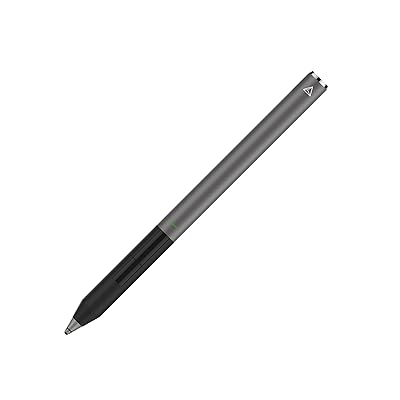
Adonit Pixel Pro - iPad Pro Professional Stylus Pen,Palm Rejection, Programmable Buttons Key Shortcuts, Charger Dock for Fast Charging, Bluetooth 4.0
Item #:
7180771
XOF 600060
Price Details
Excluding Shipping & Custom charges ( Shipping and custom charges will be calculated on checkout )
*All items will import from US
0 ratings
Write a review
Out of stock
 Imported from USA store
Secured transaction
Ubuy works hard to protect your security and privacy. Our advanced payment security system ensures confidentiality by encrypting your information during transmission using AES (Advanced Encryption Standards) and SSL (Secure Socket Layer) protocols. Your payment details are 100% secure as we do not share your payment details with third party sellers.
Our Top Logistics Partners


The new and improved 1.9mm Pixel point tip provides increased accuracy and a paper-like drag for a natural writing and drawing experience.

Fast
Shipping

Free
Return*

Secure Packaging

100% Original Products

PCI DSS Compliance

ISO 27001 Certified


Note: Step Down Voltage Transformer required for using electronics products of US store (110-120). Recommended power converters Buy Now.


What Stands Out
Palm Rejection
Experience seamless writing and drawing without interruptions. Palm rejection technology allows users to rest their hand comfortably on the screen, enhancing productivity and creativity.
Programmable Buttons
Customize your workflow with programmable shortcuts at your fingertips. Quick access to tools boosts efficiency, making it ideal for professionals needing fast transitions during tasks.
Fast Charging Dock
Stay ready for action with a charging dock that rapidly powers your stylus. Enjoy extended use with minimal downtime, ensuring your creative flow isn't disrupted.
Product Details
| Item Weight | 0.04 lbs (20 grams) |
Who Should Buy?

-
Digital Artists
Perfect for artists needing precise control and pressure sensitivity for drawing and painting on the iPad Pro.
-
Note-Takers
Ideal for students or professionals who prefer handwritten notes and sketches during lectures or meetings.
-
Design Professionals
Beneficial for graphic designers, allowing shortcuts and customizable buttons to enhance workflow efficiency.

-
Casual Users
Not suitable for those who only use the iPad for basic tasks, as it offers advanced features beyond their needs.
-
Budget-Conscious
May not fit users looking for affordable options since it is priced higher compared to standard stylus pens.
-
Children's Use
Not ideal for kids who might not require advanced features and could benefit from simpler, more durable options.
Product Description
Adonit Pixel Pro - iPad Pro Professional Stylus Pen,Palm Rejection, Programmable Buttons Key Shortcuts, Charger Dock for Fast Charging, Bluetooth 4.0 for iPad Pro 9.710.512.9 or Newer, Space Grey
Have any Query? Chat with us
Customer Questions & Answers
-
Question:
What are the main features of the Adonit Pixel Pro stylus pen?
Answer: The Adonit Pixel Pro offers several standout features including palm rejection, programmable buttons for shortcuts, and a fast-charging dock. Palm rejection allows you to comfortably rest your hand on the screen without causing unwanted marks, which is essential for artists and note-takers. The programmable buttons enable you to customize functions based on your preferences, enhancing productivity and workflow. Additionally, the charger dock provides a convenient way to keep your stylus powered up for immediate use, which is great for professionals who are constantly on-the-go. -
Question:
Is the Adonit Pixel Pro compatible with all iPad models?
Answer: The Adonit Pixel Pro is primarily designed for use with specific models of the iPad Pro and other compatible iPads, particularly those that support Bluetooth connectivity. Before purchasing, it's important to check the compatibility list on the Adonit website or product documentation. This ensures that you can take full advantage of all the features, such as pressure sensitivity and palm rejection, optimizing your creative or productivity tasks. -
Question:
How does palm rejection work with the Adonit Pixel Pro?
Answer: Palm rejection technology in the Adonit Pixel Pro allows you to rest your hand comfortably on the iPad's screen while writing or drawing, without interfering with the digital input. This feature is made possible through smart sensors within the stylus that detect the difference between the stylus and your palm. This functionality is especially useful for artists and students who need to take notes, enabling a more natural writing or drawing experience without interruption. -
Question:
Can I customize the shortcuts on the Adonit Pixel Pro?
Answer: Yes, one of the significant advantages of the Adonit Pixel Pro is its programmable buttons which you can customize for shortcuts in supported apps. By setting these buttons to specific functions—like erasing, switching tools, or accessing menus—you can streamline your workflow, making it more efficient. This is particularly beneficial for designers and illustrators, as it allows them to maintain their creative flow without needing to navigate through menus. -
Question:
What type of charging does the Adonit Pixel Pro use?
Answer: The Adonit Pixel Pro features a dedicated charging dock that supports fast charging functionality. By simply placing the stylus in the dock, you can quickly recharge it, ensuring that it is always ready for use. This is perfect for busy professionals who may need to charge quickly between tasks. The compact design of the docking station also allows it to fit seamlessly into your workspace. -
Question:
Does the Adonit Pixel Pro support pressure sensitivity?
Answer: Yes, the Adonit Pixel Pro supports pressure sensitivity, allowing it to recognize the level of pressure applied to the screen. This feature is critical for artists and designers as it enables them to create dynamic lines and varying stroke thicknesses in their work, mimicking the feel of traditional drawing tools. This capability empowers users to execute detailed illustrations or handwriting with depth and nuance. -
Question:
How does Bluetooth connectivity enhance the functionality of the Adonit Pixel Pro?
Answer: Bluetooth connectivity on the Adonit Pixel Pro enables seamless pairing with your iPad, allowing features such as customizable shortcuts and enhanced performance in supported apps. Once paired, the stylus can instantly communicate with the device, making it ideal for tasks such as sketching, digital painting, or note-taking. This connectivity ensures that the user has a responsive and interactive experience with minimal lag, which is vital for creative work. -
Question:
What is the weight and size of the Adonit Pixel Pro?
Answer: The Adonit Pixel Pro is designed to be lightweight and compact, making it easy to carry without adding bulk. This ergonomic design ensures that it fits comfortably in hand, allowing for long hours of use without discomfort. Whether being used for detailed art projects or extended note-taking sessions, its size and weight make it an excellent choice for portability and convenience. -
Question:
Is the Adonit Pixel Pro suitable for note-taking and drawing?
Answer: Absolutely! The Adonit Pixel Pro is an ideal tool for both note-taking and drawing. Its palm rejection feature allows users to rest their hands on the iPad while writing or sketching, providing a natural experience. Additionally, the precision and pressure sensitivity ensure that lines are accurately rendered, making it perfect for detailed illustrations or neat notes. This versatility makes it a favorite among students, designers, and artists alike. -
Question:
Where can I buy the Adonit Pixel Pro in Burkina Faso?
Answer: You can purchase the Adonit Pixel Pro from Ubuy in Burkina Faso. Ubuy offers a straightforward shopping experience with a broad selection of tech products, including the Adonit Pixel Pro stylus pen. Browse through their website to find this stylus and take advantage of their efficient service, ensuring you receive your product promptly and securely.
Adonit Styluses Editorial Review
The Adonit Pixel Pro boasts features ideal for professional usage, such as palm rejection, programmable buttons, and a convenient charger dock for fast charging. However, the customer experience has been mixed. While some users found it to work well with their iPads and appreciated its functionality, there were complaints about unresponsiveness, poor palm rejection, and intermittent connectivity. Several users reported returning the stylus and opting for the Apple Pencil due to these issues. Others experienced challenges with pressure sensitivity and noted that it required more pressure than expected. The stylus also seemed to have limitations with certain apps, leading to frustration and inefficiency for those seeking to use it for note-taking and drawing applications.
Customer Reviews & Ratings
1 customers ratings
-
5 Star
100%
-
4 Star
0%
-
3 Star
0%
-
2 Star
0%
-
1 Star
0%
Review this product
Share your thoughts with other customers
Pros
- Programmable buttons and fast charging dock
- Compatibility with iPad Air 2
- Works well for some users
Cons
- Poor palm rejection
Product Price History
Important information
- Limitations : For products shipped internationally, please note that any manufacturer warranty may not be valid; manufacturer service options may not be available; product manuals, instructions, and safety warnings may not be in destination country languages; the products (and accompanying materials) may not be designed in accordance with destination country standards, specifications, and labeling requirements; and the products may not conform to destination country voltage and other electrical standards (requiring use of an adapter or converter if appropriate). The recipient is responsible for assuring that the product can be lawfully imported to the destination country. When ordering from Ubuy or its affiliates, the recipient is the importer of record and must comply with all laws and regulations of the destination country.
- Not all the products listed on Ubuy are for sale, as Ubuy is a global search engine. Products are subject to export/trade regulations.
XOF 600060
Currently unavailable.
We don't know when or if this item will be back in stock.
This item is not restrict in my country.(Please click on above link if this item is not restrict in your country, So our team will review and allow.)
Secured transaction
Ubuy works hard to protect your security and privacy. Our advanced payment security system ensures confidentiality by encrypting your information during transmission using AES (Advanced Encryption Standards) and SSL (Secure Socket Layer) protocols. Your payment details are 100% secure as we do not share your payment details with third party sellers.
Our Top Logistics Partners
Fastest cross-border delivery
Features & Benefits
- 1.9mm Pixel point tip for increased accuracy
- Natural writing and drawing experience
- 2048 levels of pressure sensitivity and enhanced Palm Rejection
- Programmable shortcut buttons for frequently used tools
- Grip sensor turns the stylus on when picked up
- Magnetic charging Dock for fast charging and storage