0 ratings


Item #:
814878
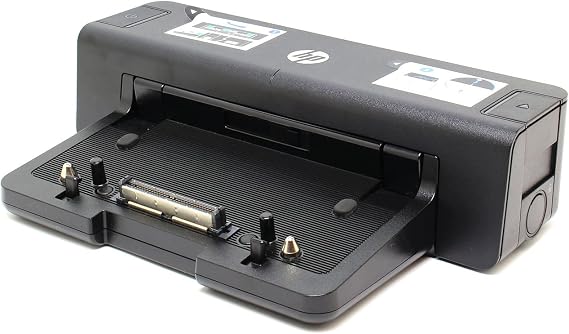
HP A7E32 90W Docking Station - Port Replicator - A7E32AA
86% of respondents would recommend this to a friend
Item #:
814878
XOF 32650
Price Details
Excluding Shipping & Custom charges ( Shipping and custom charges will be calculated on checkout )
*All items will import from US
0 ratings
Write a review
In stock
 Imported from USA store
QTY:
Order now and get it around Friday, October 09
Secured transaction
Ubuy works hard to protect your security and privacy. Our advanced payment security system ensures confidentiality by encrypting your information during transmission using AES (Advanced Encryption Standards) and SSL (Secure Socket Layer) protocols. Your payment details are 100% secure as we do not share your payment details with third party sellers.
Our Top Logistics Partners


Desktop convenience with full port replication capability in a space-saving design.

Fast
Shipping

Free
Return*

Secure Packaging

100% Original Products

PCI DSS Compliance

ISO 27001 Certified



Note: Step Down Voltage Transformer required for using electronics products of US store (110-120). Recommended power converters Buy Now.


What Stands Out
Multiple Connectivity
The HP A7E32 Docking Station offers extensive connectivity options, including USB, HDMI, and Ethernet ports, enabling seamless connection to various devices for increased productivity and convenience.
Compact Design
Its compact design minimizes desk clutter while providing essential ports, appealing to professionals seeking efficiency without sacrificing valuable workspace.
Power Delivery
With 90W power delivery, this docking station charges compatible laptops while providing robust connectivity, ensuring devices are powered during consistent use without interruptions.
Product Details
| Hardware Interface | USB 3.0 |
| Compatible Devices | HP ELITEBOOK 8xxx Series |
| Total Usb Ports | 4 |
| Number of Ports | 14 |
| Wattage | 90 watts |
| Item Weight | 4.3 pounds (1.95 kg) |
| Color | Black |
| Brand | HP |
| Number of Items | 1 |
| UPC | 887111347237 804066549561 886112501693 |
| Manufacturer | hp |
| Model Number | A7E32AA#ABA |
| Mfr Part Number | A7E32AA#ABA |
| Total USB Ports | 4 |
Who Should Buy?

-
Business Professionals
Ideal for professionals needing multiple connections for monitors, printers, and peripherals in a workstation setup.
-
Frequent Travelers
Lightweight and efficient, perfect for users who require easy docking and undocking while on the go.
-
Home Office Users
Great solution for home office setups, providing essential connectivity without cluttering desk space.

-
Gaming Enthusiasts
May not support high-performance graphics required for gaming, limiting graphics-intensive tasks.
Product Description
HP A7E32 90W Docking Station - Port Replicator - A7E32AA
Have any Query? Chat with us
Customer Questions & Answers
-
Question:
What devices are compatible with the HP A7E32 90W Docking Station?
Answer: The HP A7E32 90W Docking Station is primarily designed for HP laptops that feature a Smart Ac connector, USB Type-C, or legacy USB connections. It supports various HP professional series laptops like EliteBook, ProBook, and ZBook models. This versatility ensures that users can connect multiple devices, such as monitors, keyboards, and mice, enhancing their productivity. This makes it ideal for users working in office environments or for those looking to create an efficient workstation setup at home. -
Question:
What ports does the HP A7E32 Docking Station offer?
Answer: The HP A7E32 Docking Station features a comprehensive array of ports, including HDMI, DisplayPort, USB-C, and USB-A ports, as well as Ethernet and audio jacks. This rich selection allows users to connect multiple peripherals and displays, essential for multitasking and creating a seamless workflow. For instance, a user can connect a dual monitor setup while also having printers and external storage devices connected, making it ideal for professionals who rely on multiple tools for their work. -
Question:
Does the HP A7E32 Docking Station support dual monitors?
Answer: Yes, the HP A7E32 Docking Station supports dual monitor setups. With one HDMI and one DisplayPort, users can easily extend their workspace to two external displays. This capability is particularly beneficial for graphic designers, financial analysts, or anyone requiring detailed multitasking across multiple applications. Consider a situation where a user has a spreadsheet open on one monitor while running a presentation on another, boosting their efficiency and productivity. -
Question:
Is the HP A7E32 Docking Station plug and play?
Answer: Yes, the HP A7E32 Docking Station is designed for plug-and-play functionality, allowing for a hassle-free setup. Users can simply connect their laptop to the dock, and it will automatically recognize the connected devices without needing to install additional software. This means that even those who may not be tech-savvy can quickly set up their workstation without technical difficulties. Such simplicity is a real advantage for temporary setups, such as occasionally working from home or in shared offices. -
Question:
What is the power output of the HP A7E32 Docking Station?
Answer: The HP A7E32 Docking Station provides up to 90W of power to connected devices, which is adequate for most HP laptops and ensures that users can work without worrying about battery life. This means you can plug in your laptop for charging while using multiple peripherals. For instance, connecting to a monitor and keyboard while ensuring your laptop remains charged, allows for uninterrupted productivity, especially during long working hours. -
Question:
Can I charge my laptop through the HP A7E32 Docking Station?
Answer: Yes, the HP A7E32 Docking Station allows for charging your laptop while it is docked, providing a convenient all-in-one solution. With its 90W power output, it ensures that compatible HP laptops receive sufficient power during use. This feature is particularly advantageous in preventing downtime, as you can work and charge simultaneously. Imagine an office setup where your laptop is charging as you conduct a presentation on a large screen–it enhances both productivity and efficiency. -
Question:
What type of chargers or cables are needed for the HP A7E32 Docking Station?
Answer: The HP A7E32 Docking Station typically comes with a compatible power adapter, allowing users to easily connect it to a power source. For connectivity, standard USB-C cables or HDMI/DisplayPort cables for additional monitors are generally recommended. Using the right type of cables ensures optimal performance without data bottlenecks or charging issues. Consider a scenario where a user sets up an efficient multi-monitor display for enhanced productivity in graphic design workflows. -
Question:
Is the HP A7E32 Docking Station compatible with non-HP laptops?
Answer: The HP A7E32 Docking Station is primarily designed for HP laptops and may not completely support non-HP devices. While certain functions like USB connections might work, key features such as power delivery and display outputs could be limited. This is crucial for users who may need a universal docking solution. If you're using non-HP devices extensively, you might want to ensure compatibility before investing in this dock. -
Question:
What is included in the package of HP A7E32 Docking Station?
Answer: The HP A7E32 Docking Station package typically includes the docking station itself and a power adapter. Some versions may include documentation for setup and troubleshooting. Expect to receive everything needed to begin connecting your laptop and peripherals right out of the box. This seamless initial setup is especially appealing for businesses looking to deploy multiple workstations efficiently without the hassle of additional purchases. -
Question:
Where can I buy HP A7E32 90W Docking Station - Port Replicator - A7E32AA?
Answer: You can purchase the HP A7E32 90W Docking Station on Ubuy. Ubuy is a reliable e-commerce platform that offers a range of products, including electronics and accessories. Their user-friendly site makes it simple to find the docking station you need alongside product specifications and customer reviews to aid in your decision-making process.
HP Docking Stations A7E32AA#ABA Editorial Review
HP A7E32 90W Docking Station - Port Replicator - A7E32AA offers versatile connectivity for HP Elitebook 8000 series, featuring 14 ports including 4 USB 3.0 ports. Users appreciate its functionality and the convenience it brings, such as easily connecting multiple peripherals and external displays. Several reviews highlight the ease of setup, with one user mentioning, 'it worked as expected' from the moment it was plugged in, making it an excellent choice for home office setups. Moreover, the docking station's 90W power supply ensures that devices remain charged while connected. However, some users reported issues with the LAN port after a few months of use, which may be a concern for potential buyers.
Customer Reviews & Ratings
1 customers ratings
-
5 Star
100%
-
4 Star
0%
-
3 Star
0%
-
2 Star
0%
-
1 Star
0%
Review this product
Share your thoughts with other customers
Pros
- Supports multiple peripherals with 14 total ports
- Four USB 3.0 ports for expanded connectivity
- Perfect for HP Elitebook 8000 series
- Easy setup for home office use
- Compact and lightweight design
Platform Trust & Buyer Confidence

JK
Jasmin
Verified buyer
“Great products and very good service: very easy and very fast international delivery.”
9 September 2026 · via Trustpilot
AG
Anke
Verified buyer
“Wonderful online shopping experience, smooth transaction from the start. Payment method works conveniently and delivery is unexpectedly fast and reliable. You go the extra mile for service. What makes this even more amazing, you deliver to Namibia. I will remain a happy Ubuy customer and will increase my purchases for sure! Thank you!”
10 September 2026 · via Trustpilot
H
Hazel
Verified buyer
“Very easy to find the products what you need, and so fast delivery, that’s why I highly recommended to others costumers to used ubuy.”
10 September 2026 · via Trustpilot
O
Opaleye
Verified buyer
“I received exactly what I ordered I was skeptical about your site because that was my first time to order. But the order came timely and neatly packaged. I was not disappointed. Thank you.”
11 September 2026 · via Trustpilot
AC
Adele
Verified buyer
“Easy to find and order what you want on the website. Delivery is quick to the UK”
8 September 2026 · via Trustpilot
Secure Checkout
Global Delivery
Easy Returns
Genuine Products
Product Price History
Important information
- Limitations : For products shipped internationally, please note that any manufacturer warranty may not be valid; manufacturer service options may not be available; product manuals, instructions, and safety warnings may not be in destination country languages; the products (and accompanying materials) may not be designed in accordance with destination country standards, specifications, and labeling requirements; and the products may not conform to destination country voltage and other electrical standards (requiring use of an adapter or converter if appropriate). The recipient is responsible for assuring that the product can be lawfully imported to the destination country. When ordering from Ubuy or its affiliates, the recipient is the importer of record and must comply with all laws and regulations of the destination country.
- Not all the products listed on Ubuy are for sale, as Ubuy is a global search engine. Products are subject to export/trade regulations.
XOF 32650
Order now and get it around Friday, October 09
This item is not restrict in my country.(Please click on above link if this item is not restrict in your country, So our team will review and allow.)
QTY:
Secured transaction
PCI DSS compliant and ISO 27001:2022 certified, with encrypted payments and full buyer protection on every order.
Our Top Logistics Partners
Fastest cross-border delivery
Features & Benefits
- Comfortable port replication and cable management.
- Backward compatibility with older devices.
- Charger the notebook while in the docking station.
- Space-saving design with full port replication capability.
- Includes four USB 3.0 ports and DisplayPort 1.2 support.
- Compatible with various HP ProBook and EliteBook models.
Ubuy Assurance
Experience worry-free shopping with 100% original products, PCI DSS-compliant payment security, ISO 27001-certified data protection, the fastest cross-border delivery, free returns *, and secure packaging on every order.